分类: R语言

  • Rstudio的 rmarkdown文档可以上传RPubs

    Getting Started with RPubs

    RStudio lets you harness the power of R Markdown to create documents that weave together your writing and the output of your R code. And now, with RPubs, you can publish those documents on the web with the click of a button!

    Prerequisites

    You’ll need R itself, RStudio (v0.96.230 or later), and the knitr package (v0.5 or later).

    Instructions

    1. In RStudio, create a new R Markdown document by choosing File | New | R Markdown.
    2. Click the Knit HTML button in the doc toolbar to preview your document.
    3. In the preview window, click the Publish button

    我的上传网址 https://rpubs.com/czliutz

  • 卡方检验

    chisq.test()函数对二维表的行列变量进行卡方检验

    使用vcd包中Arthritis数据集

    library(vcd)

    生成列联表格式

    mytable <- xtabs(~Treatment+Improved,data = Arthritis)

    卡方检验

    chisq.test(mytable)

    Pearson's Chi-squared test

    data: mytable
    X-squared = 13.055, df = 2, p-value = 0.001463

    p值小于0.05,说明治疗情况和改善情况不独立。

    Fisher精确检验
    fisher.test()函数
    格式fisher.test(mytable),mytable是一个二维列联表

    library(vcd)
    mytable <- xtabs(~Treatment+Improved,data = Arthritis)

    调用fisher.test()函数

    fisher.test(mytable)

    Fisher's Exact Test for Count
    Data

    data: mytable
    p-value = 0.001393
    alternative hypothesis: two.sided

    P小于0.05,两者之间不独立

    Cochran-Mantel-Haenszel检验
    为两个二分类变量进行分层卡方检验。
    mantelhaen.test()

    mytable <- xtabs(~Treatment+Improved+Sex,data = Arthritis)

    调用mantelhaen.test()函数

    mantelhaen.test(mytable)

    Cochran-Mantel-Haenszel test

    data: mytable
    Cochran-Mantel-Haenszel M^2 =
    14.632, df = 2, p-value =
    0.0006647

    结果表明,患者接受的治疗与得到的改善在性别的每一水平下并不独立

    其他实例

    #四个表卡方检验--数据框数据格式
    a <- c(9,2)
    b <- c(4,9)
    y <- data.frame(a,b)
    chisq.test( y)
    chisq.test(y,correct = F)  #无连续性较正计算结果
    chisq.test(y)$observed  #观察值(实际数)
    chisq.test(y)$expected  #期望值(理论数)
    print('=======================')
    fisher.test(y)
    #四个表卡方检验---矩阵数据格式
    z <- matrix(c(12, 5, 7, 7), ncol = 2)
    chisq.test(z)
    print('======================')
    #行X列表卡方检验
    x <- matrix(c(50,48,18,72,105,10,7,23), ncol = 2)
    chisq.test(x)
    print('======================')
  • R读取文本文件后,获得数据的类型转换

    
    x<-read.delim("C:/Users/liutz/Documents/101名健康女职工血清总胆固醇测量结果.txt")
    head(x)
    #y<-as.numeric(x)
    #错误: 'list' object cannot be coerced to type 'double'
    y<-as.numeric(unlist(x))
    write.csv(y,file="data.csv")
    hist(y,breaks=12,main="直方图")

  • R语言–条件-循环

    #if for matrix
    
    i<-10
    i
    y<-if (i<5){3} else {10}
    y
    
    for(i in 1:10){
    + print(i*i)
    }
    
    x<-matrix(1:30,nrow=5)
    x
    for(i in seq_len(nrow(x))){
         for (j in seq_len(ncol(x))){
         print(x[i,j]);
        }
      print(rep(i,nrow(x)))
    } 
  • R绘制饼图

    ```{r}
    par(mfrow=c(2,2))
    slice<-c(10,12,4,16,8)
    lbls <- c("US","UK","Australia","Germany","France")
    pie(slice,labels = lbls,main = "Simple Pie Chart")
    pct <- round(slice/sum(slice)*100)
    lbls2 <- paste(lbls,' ',pct,"%",sep = " ")
    pie(slice,labels = lbls2,col=rainbow(length(lbls2)),main = "Pie Chart with Percentages")
    
    library(plotrix)
    pie3D(slice,labels=lbls,explode=0.1,main="3D Pie Chart")
    
    mytable <- table(state.region)
    lbls3 <- paste(names(mytable),"\n",mytable,sep=" ")
    pie(mytable,labels = lbls3,main = "Pie Chart from a table\n (with sample size)")
    
    ```
  • R语言 内置数据集

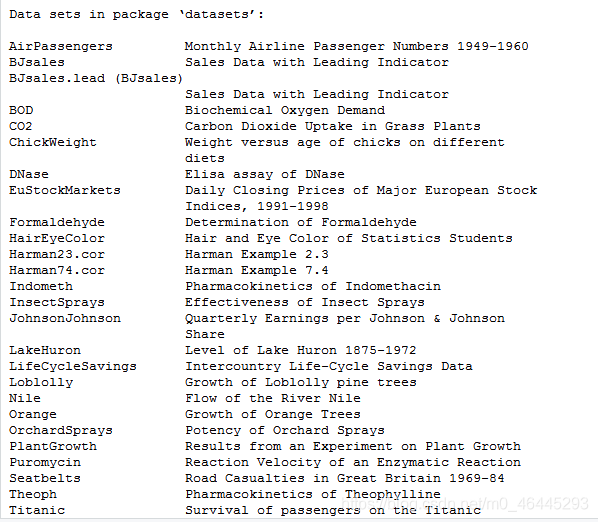
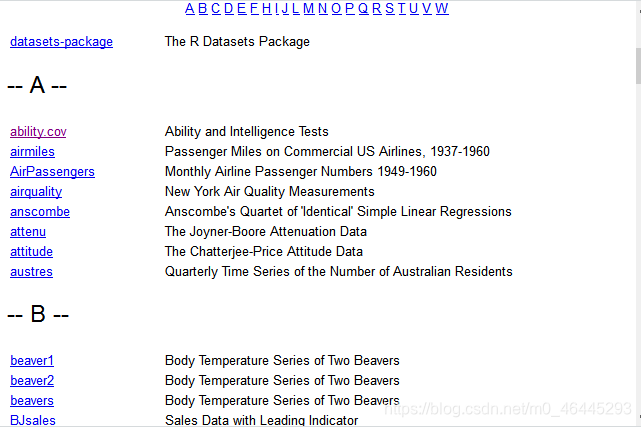
    help(package='datasets')

    查看数据集帮助 在这里插入图片描述

    data()

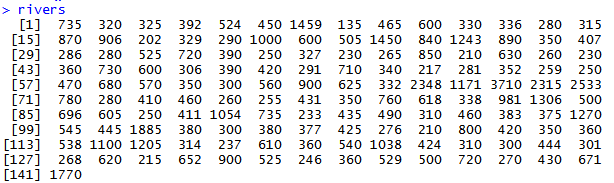
    访问数据集 在这里插入图片描述 前面为数据集名字,后面介绍数据集的内容,包含了R所有用到的数据类型(向量,矩阵,列表,因子,数据框,时间序列等)。 直接输入数据集的名字就可以输出数据: 在这里插入图片描述 这些数据集的名字都是内置的,一般在给变量命名时最好避免重复,否则数据集会被置换掉。
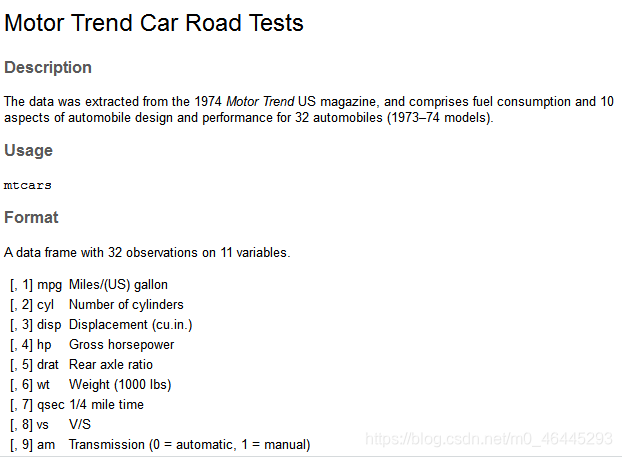
    help("mtcars")

    查看具体数据集的信息 在这里插入图片描述 列出R扩展包加载扩展包中的数据集

    data(package="MASS")

    显示R中所有可用数据集

    data(package=.packages(all.available = TRUE))

    如果不想加载R包但想加载其中的数据集,直接使用data函数加载数据集 eg

    data(Chile,package="car")
    Chile
  • tidyverse数据筛选

    ---
    title: "R Notebook"
    output: html_notebook
    ---
    
    
    ```{r}
    library(tidyverse)
    starwars %>%
    select(sex,height,mass,species) %>%
      mutate(height=height/100)  %>%
      filter(species =="Human")  %>%
      group_by(sex) %>%
      summarise( mean(height,na.rm = TRUE))
    
    ```